Blog Category : WTC Blogs
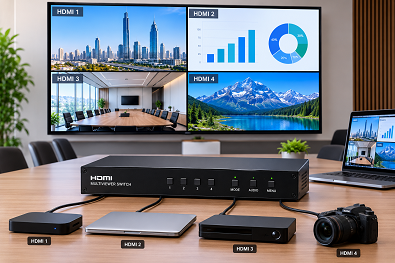
Managing multiple video sources can become difficult if you have to switch between screens all the time. An HDMI Multiviewer Switch makes this easier by allowing you to display and manage several HDMI sources from a single display. It is a practical solution for meeting rooms, control rooms, broadcast environments, and other professional AV applications where multiple video feeds need to be viewed together.
Choosing the right HDMI Switch is important because different projects have different requirements. Looking at the key features before buying helps you choose a solution that works well with your AV setup. Let’s discuss more.
A multiviewer is more than a display device. It helps users monitor several video inputs at the same time while keeping the workspace organised. The right solution also makes it easier to manage presentations, live monitoring, and professional AV installations.
We help customers choose HDMI multiviewer solutions that fit their project requirements and work smoothly with other professional AV equipment.
Multiple HDMI Inputs
The first thing to check is the number of HDMI input ports. Different projects require different numbers of connected devices.
For example:
Application : Suggested HDMI Inputs
Small Meeting Room : 2–4 Inputs
Training Room : 4 Inputs
Control Room : Multiple Inputs
Professional AV Setup : Multiple HDMI Sources
Selecting the right number of inputs makes future expansion easier.
A good HDMI Multiviewer Switch should support different display layouts. This allows users to view one screen in full size or display several HDMI sources on the same screen at the same time.
Flexible layouts help improve monitoring and presentation management.
Clear image quality is important in any professional AV project. A quality HDMI multiviewer should deliver sharp video output while maintaining stable signal performance between connected devices.
This helps improve the viewing experience in meeting rooms, command centres, and other business environments.
The multiviewer should work smoothly with existing AV systems. Easy integration with displays, matrix switches, collaboration systems, and other AV equipment helps reduce installation time and makes the overall solution easier to manage.
An HDMI multiviewer is used in many professional environments where multiple video sources need to be monitored together.
Some common applications include:
Choosing the right model depends on the number of connected devices and the purpose of the installation.
Selecting the right equipment is only one part of the project. Correct installation and system configuration help ensure the HDMI multiviewer works properly with the complete AV setup.
Our team helps customers understand their project requirements before recommending the most suitable solution. We also provide support for integrating multiviewer systems with professional AV environments.
This approach helps businesses build reliable and well-organised AV systems.
Every AV installation is different, so there is no single solution that fits every application. The right HDMI Multiviewer Switch should offer the required number of HDMI inputs, flexible screen layouts, high-quality video output, and smooth integration with other AV equipment.
If you are planning a professional AV project, WTC Systems LLC provides reliable HDMI multiviewer solutions along with expert guidance and technical support. Our team helps businesses choose the right products to build efficient and dependable AV systems across the UAE and the wider region.


 Support